Your schema diagram is a screenshot. It has been wrong since March.
A free, self-hosted entity relationship (ER) diagram editor that reads your
real database — PostgreSQL, MySQL and more.
One command to run. No licences, no user limit, nothing leaves your network.
PKEvery person in the data office can open the modelnot null
FKThe model points at a real database, not at a picture of onereferences production
NSchema metadata stays inside your networkno telemetry
PKproblemA model only one person is allowed to fix
Three things go wrong, and they compound. The third is the one people notice; the first is the one that caused it.
Licensed per person
The licence goes to the architect
Serious ER tools are sold by headcount, so the licence goes to whoever draws. The analyst, the BA and the new engineer get a screenshot in Confluence instead — and a screenshot cannot be corrected by the person who spots the error.
Cloud-only
It never clears the security review
Browser-based editors want your DDL pasted in, or a route to your database. In a bank or a telecom that conversation ends in five minutes, and the team goes back to drawing rectangles by hand.
Draws, does not read
Nobody can tell if it is still true
Free tools draw pictures. They do not connect to production, so nothing tells you the diagram and the database drifted apart. The diagram stops being evidence and becomes decoration.
FKaudienceWho opens it, and what for
One model, several jobs. This is what "the whole data office" means in practice.
Role
What they do with the model
Data architect
Designs the physical schema: tables, columns, data types, primary and foreign keys, indexes and constraints. Reverse-engineers an existing DBMS, then works from the real structure rather than from memory.
Data engineer
Exports DDL for the target dialect, compares the model against production before a release, and keeps migrations honest by seeing the drift instead of guessing at it.
Data analyst
Reads the model to find out where a number actually comes from — which table, which column, which relationship — without waiting for someone to export a picture.
Business analyst
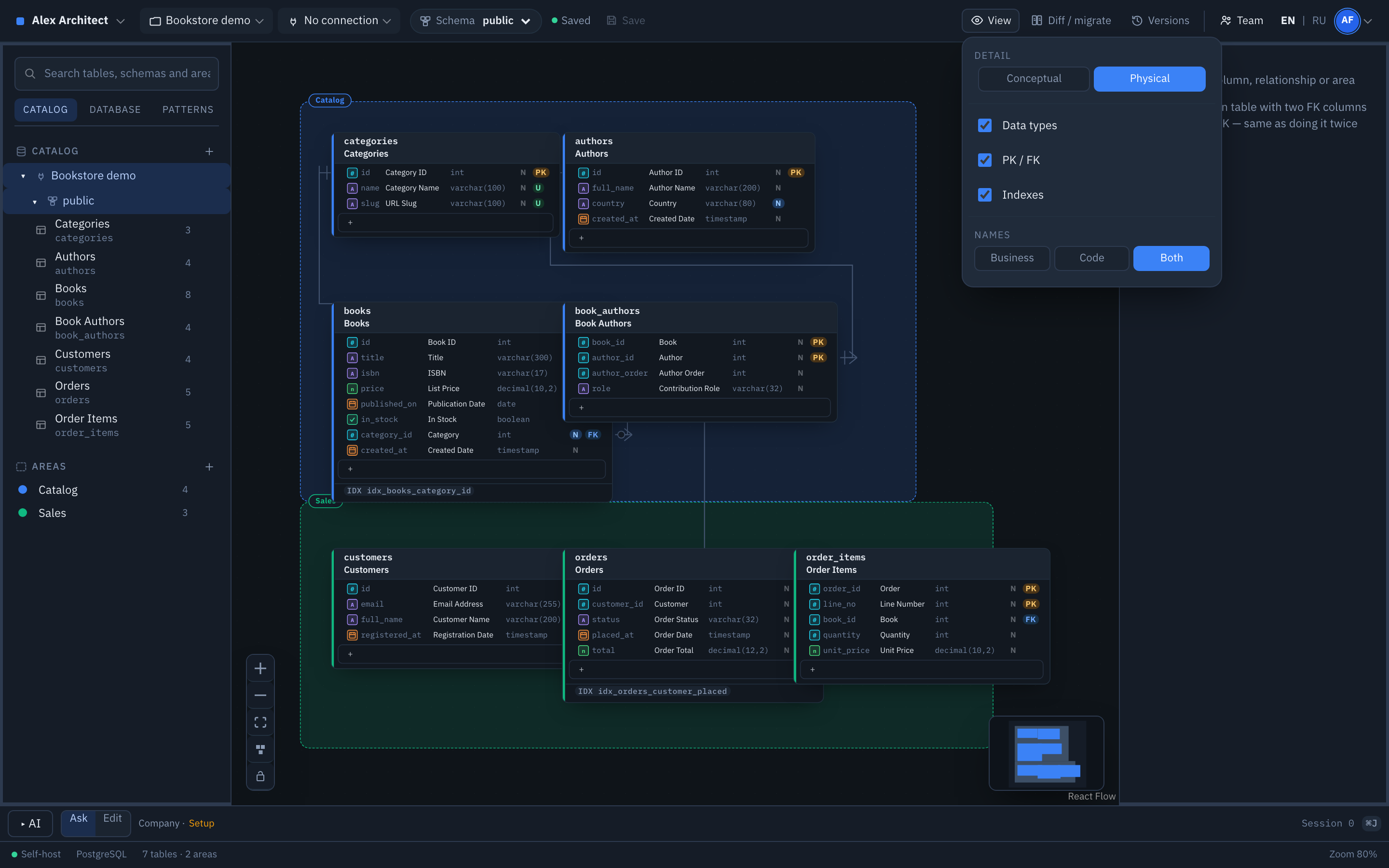
Works on the conceptual level: entities and relationships under their business names, with no types or keys in the way.
Data governance
Uses the model as the record of what exists and who may change it, with roles per project and access requests that carry a stated reason.
Data teams collaborate on one instance: several people on the same diagram, each with a role, everyone seeing the same structure. There is no licence to buy and no cap on users, so nobody is left reading a screenshot.
FKoriginThree attempts in two years
There is one task that follows a data architect through an entire career: design a relational schema quickly, clearly, and without pain. It sounds modest. In practice it is a headache.
A general-purpose diagram editor is where almost everyone starts, and where almost everyone is first disappointed. You cannot generate a diagram from a schema that already exists, and working with relationships is awkward enough that pencil and paper would be faster. On a whiteboard tool it is worse.
Over the years I worked with the serious ones: the enterprise data-modelling suites a large company licenses, and a dozen ER editors in between — the long-established products and the newer ones alike. Every one of them beat a general diagram editor by an order of magnitude. Every one of them had a price, and not only in money.
Three times in two years I sat down to find an alternative. The market does move: some of the newer tools genuinely raise the bar for database design. The catch repeated itself every time. Not merely paid — priced out of reach. A week of trial here, a community edition there, a self-hosted build somewhere else, each limited enough that you cannot finish an ordinary day's work: stand up a new data mart, or make one small correction to an ER diagram.
Then Claude, Cursor and OpenRouter changed the arithmetic. If tools like this are only ever going to be built for large enterprise, I would build one on my own. The concept took a couple of days. Getting it to a working product, and fixing what that exposed, took two weeks.
Two weeks is not a claim about maturity — it is a claim about what building software costs now. The honest status of the project is further down this page, in full.
It works well enough that I am not waiting for beta testing to finish. The build is on GitLab, and so is every line of source. Fork it, run it, change it. MIT: not one licence to buy, not one paid tier, nothing held back for an edition you have to buy.
FKhowIt doesn't draw your database. It reads it.
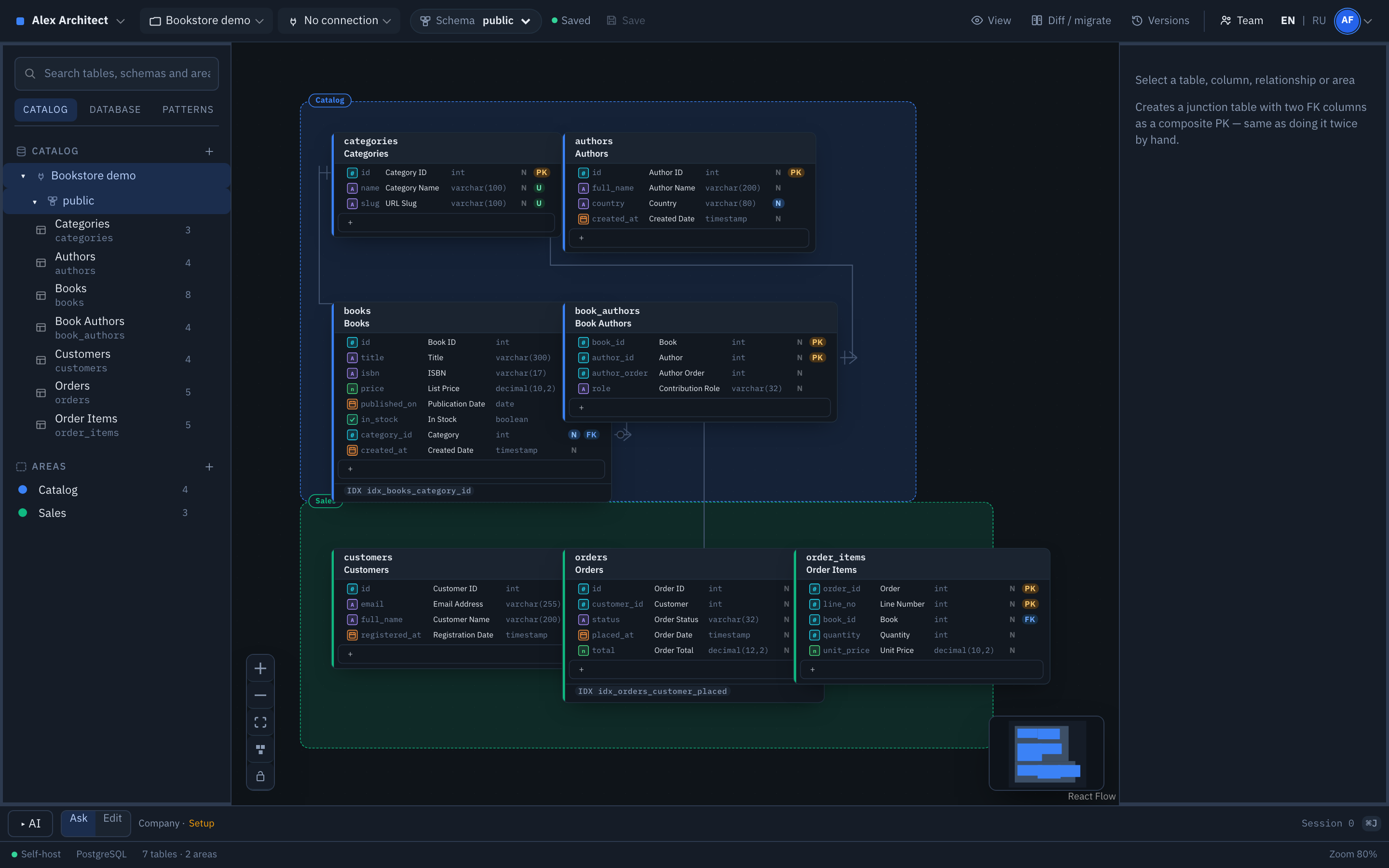
Point it at PostgreSQL or MySQL and it imports tables, columns, keys and indexes. From there the model is yours to edit — and to check against the database it came from.
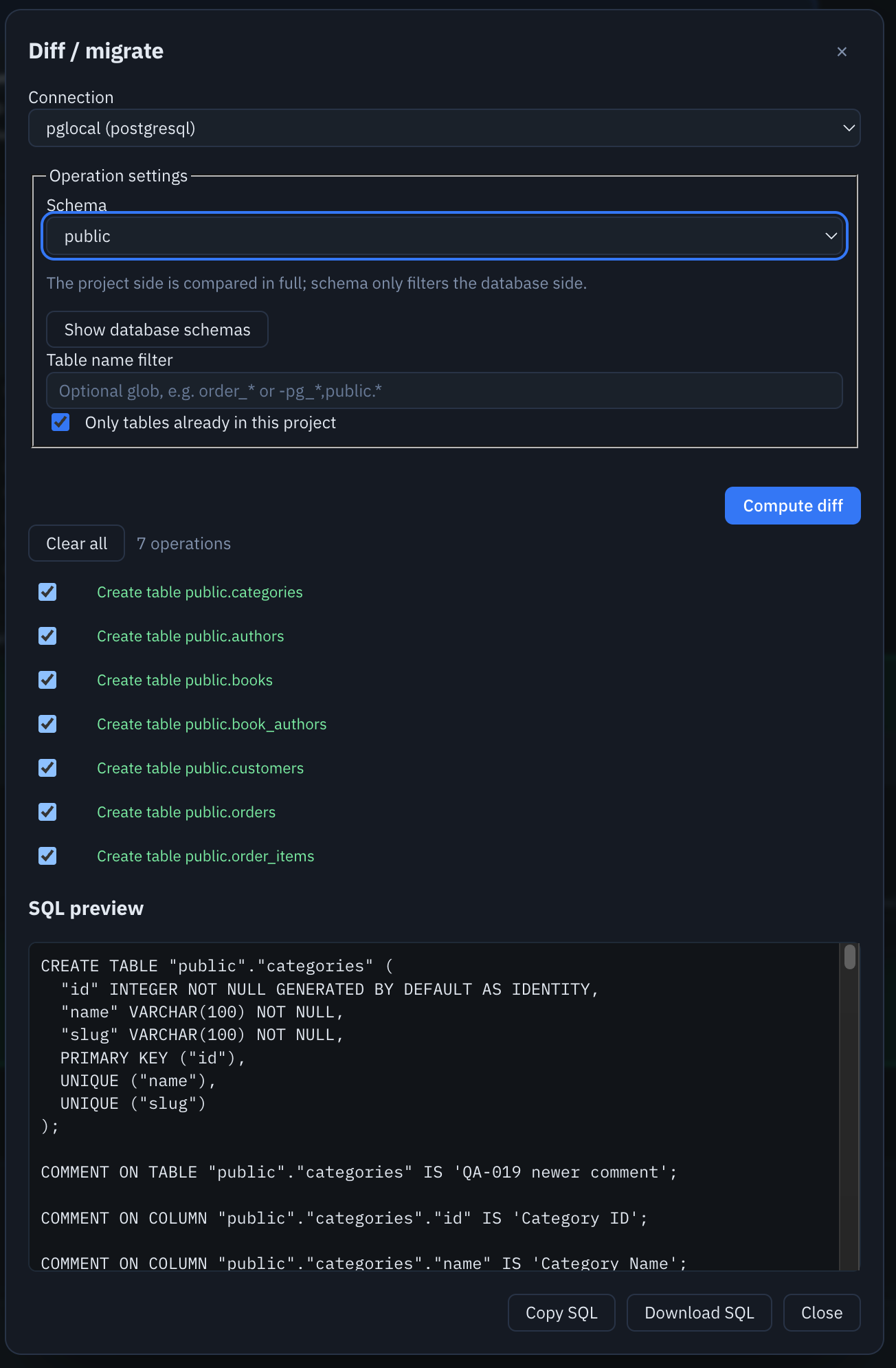
Compared against a live PostgreSQL database: seven differences, each one listed, with the SQL written out for you to read. ER Architect generates it and stops there — running it is your decision, in your own tooling.One model, two ways to read it. The architect works on the physical layer; everyone else reads business names and relationships on the same diagram, without a second document to keep in sync.
NfeaturesWhat it does
Area
Detail
Modelling
Tables, columns, data types, PK and FK by drag-and-drop, crow's foot notation. Constraints, single and multi-column indexes. Areas with colour inheritance. Auto-layout by connected component.
Reverse engineering
PostgreSQL and MySQL first-class; SQL Server, Oracle and SQLite experimental. Browse a live catalog without importing anything.
Diff
Read-only comparison against a live database, with SQL preview, clipboard and file export.
Import and export
Import DDL and DBML. Export DDL, DBML, PNG, SVG, and HTML or Markdown documentation — whole project, one table, or one Area.
Access
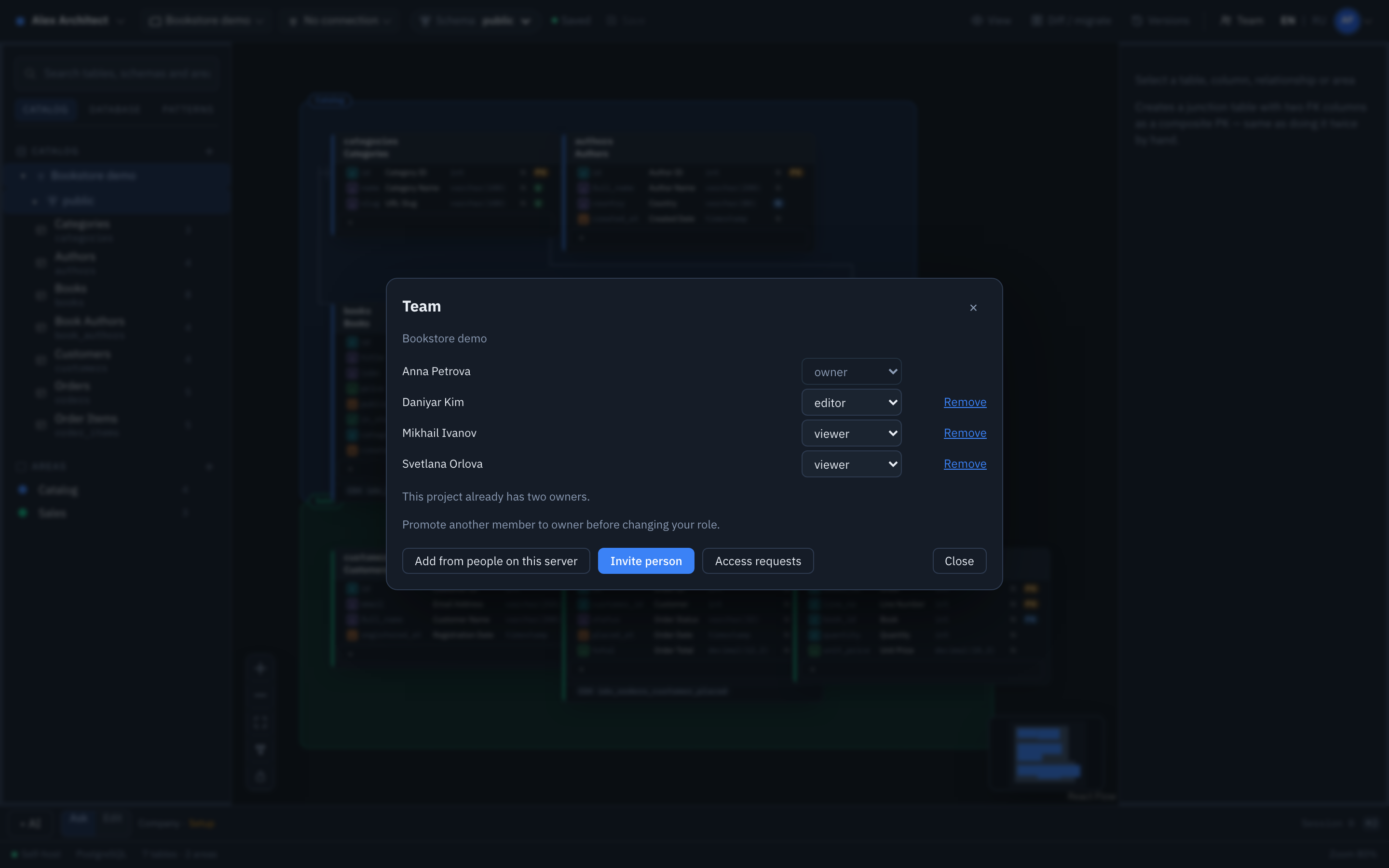
Project roles: owner, editor, viewer. Instance administrators. Access requests with a stated reason. Invite by link.
Versions
Explicit save, last 50 commits, compare and restore. Undo and redo while you work.
AI assistant
Optional, on a key you supply. Asks questions about the schema or applies edits as one undoable step. Sends schema metadata only — never row data.
Sign-in
Sessions out of the box. Google and any standards-compliant OIDC provider, including Microsoft Entra ID.
Four people on one model, three different roles. This is the whole point: the analyst who spots the error can be the one who fixes it.
NtrustWhat leaves your network
Nothing you did not configure yourself.
Outbound traffic
Only where you point it
Your database, your identity provider, and an AI provider if you turn one on. No telemetry, no analytics, no phone-home — the code is there to check.
Stored secrets
Encrypted, never returned
Database passwords are sealed with AES-256-GCM. The API returns whether a password exists, never the value — not in responses, not in logs, not in provider error messages.
NstatusWhere the project actually is
Alpha. You would find all of this out in ten minutes anyway, so here it is first.
yesPostgreSQL and MySQL are first-class. Reverse engineering, diff and DDL export are tested against live databases on every release.
yesSeveral people, one instance. Roles, invitations and access requests work; you can see who else has the diagram open.
noMigration Apply is switched off on purpose. Diff and SQL export are read-only. ER Architect will generate the SQL and let you read it; running it against your database is your call, made in your own tooling.
partSQL Server, Oracle, SQLite, ClickHouse, Redshift and StarRocks are experimental. They work in the cases we have tried and are not covered by the release gate.
noOne API process only. Presence and locks live in memory, so do not run two replicas. For a data office on one instance this is not a limit you will meet.
FKalternativesIf you arrived looking for something else
People reach a tool like this from a few directions. Here is which one you are on, stated plainly, including where ER Architect is the wrong answer.
Coming from a drawing tool
General-purpose diagram editors
Whiteboards and flowchart tools do not know what a table is. They cannot generate a diagram from a schema that already exists, cannot tell a foreign key from a line, and cannot produce DDL. ER Architect is schema-aware: it reads a real DBMS and writes SQL back out.
Coming from a browser-based ER editor
Cloud ER diagram services
They run on someone else's servers, which ends the conversation in a bank or a telecom. ER Architect is self-hosted: it runs inside your network and connects only to endpoints you configure. DBML import means a model built elsewhere is not lost.
Coming from a licensed desktop suite
Enterprise data-modelling tools
Capable products, sold per seat. The seat goes to whoever draws, so the analysts and engineers who need to read the model do not get one. ER Architect has no seats to count. It does less than an enterprise suite; it is open to everyone who needs it.
Where it is the wrong answer
Be honest about this one
If you need a full data-modelling suite with model-driven governance workflows, enterprise metadata lineage, or a dozen first-class DBMS engines, ER Architect is not that. PostgreSQL and MySQL are first-class; the rest are experimental; Migration Apply is deliberately off.
PKstartRun it
It starts the editor only — no database of its own, nothing to sign up for.
# clone, then:docker compose up --build -d# http://localhost:8080 — sign in as admin / admin, then change the password
Deploying it for a company, with your own domain, TLS and single sign-on, is two commands: the script writes the Kubernetes manifests for your domain, you apply them. That path is written up separately.
Yes. ER Architect is MIT licensed and self-hosted. There is no paid tier, no licence to buy and no limit on how many people use it. No feature is held back for an edition you have to buy. You run it on your own machine or server and everything is there from the start.
Does my schema leave my network?
No. It runs on your infrastructure and connects outward only to endpoints you configure: your database, your identity provider, and an AI provider if you enable one. There is no telemetry.
Can it build a diagram from a database that already exists?
Yes. Point it at PostgreSQL or MySQL and it reads tables, columns, primary keys, foreign keys and indexes into a diagram. SQL Server, Oracle and SQLite are supported experimentally.
Will it change my database?
No. Migration Apply is disabled server-side. Diff generates SQL for you to read, copy or download; executing it is your decision, in your own tooling.
What is an ER diagram, and what is an ER editor?
An entity relationship (ER) diagram shows the tables of a database, the columns inside them, and the relationships between them — which row points at which. An ER editor is the tool you draw and maintain that model in. ER Architect is a self-hosted ER editor that can also read the model out of a database that already exists.
Which DBMS engines does it support?
PostgreSQL and MySQL are first-class: reverse engineering, diff and DDL export are tested against live databases before every release. SQL Server, Oracle, SQLite, ClickHouse, Amazon Redshift and StarRocks are experimental — they work in the cases we have tried and are not covered by the release gate.
Can several people work on the same data model?
Yes. Data teams collaborate on one instance with roles per project — owner, editor, viewer — and can see who else has the diagram open. Each browser holds its own unsaved draft, and a save from a stale revision is rejected rather than overwriting someone else's work.
Is there a free ER diagram tool I can self-host instead of a cloud service?
That is what this is. ER Architect is MIT licensed and runs on your own machine or server, so schema metadata never reaches a third party. It imports DBML, so a model built in a browser-based editor can be brought across.
Can it generate SQL DDL from the diagram?
Yes. Export DDL for the dialect you choose at export time, for the whole project, a single table, or one area. It also exports DBML, PNG, SVG, and HTML or Markdown documentation of every table and column.
Can I use it commercially, or fork it?
Yes to both. The MIT licence permits commercial use, modification and redistribution. The full source is on GitLab.